Aurora Alarm is an alarm clock for people who turn off the alarm while asleep and don’t realize it. Instead of a button, it puts a challenge in front that must be overcome with the head or the body: mental calculation, memory, copying a phrase or shaking the phone.
The problem isn’t getting up: it’s that the hand reaches the button before consciousness. A normal alarm turns off with a gesture that can be done while asleep, and that’s why many people wake up half an hour late without remembering having turned anything off.
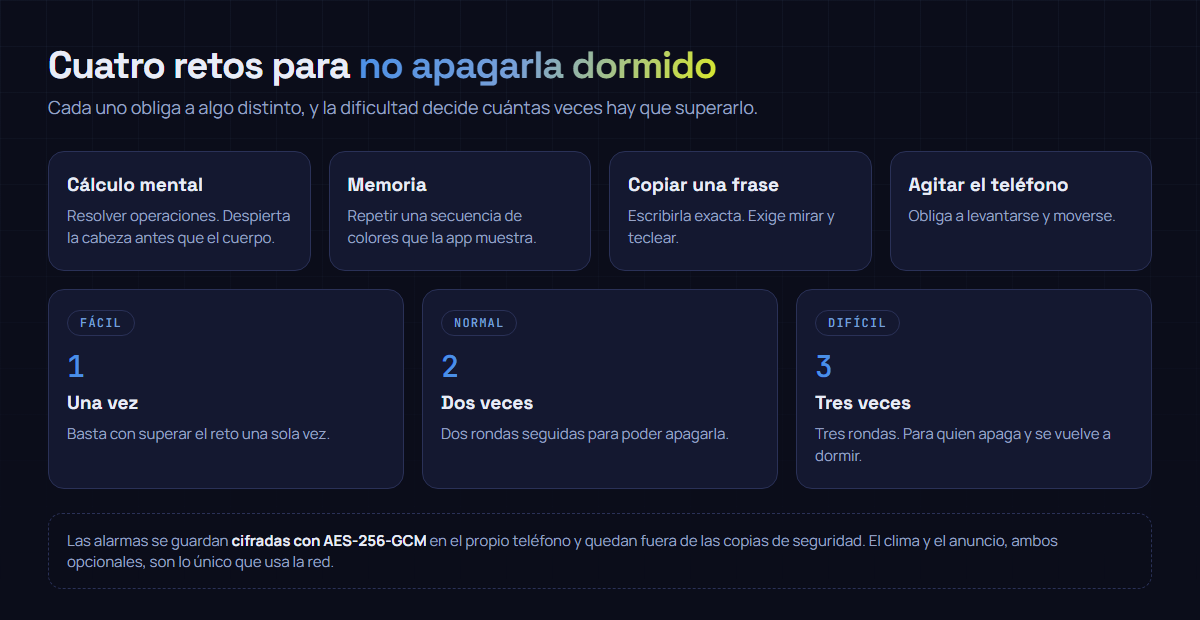
Four challenges, because not all work for everyone
Each challenge requires something different, and that’s the point. Mental calculation and color memory force you to think; they aren’t solved on autopilot. Copying a phrase forces you to look at the screen and type accurately. And shaking the phone forces you to move your body, which for some people works much better than any operation.
Difficulty doesn’t change the challenge: it changes how many times you have to overcome it consecutively. In hard mode there are three rounds, designed for those who turn it off and fall back asleep.
Alarms are encrypted, and it’s not marketing
What the app stores —your alarms, their times, their settings— is written encrypted in the phone’s private space, and stays out of system backups. In other words: it doesn’t go to the cloud even if you have Android’s automatic backups enabled.
And encryption not only hides the data: it also alerts if someone touches it. If the file were modified from outside, the app would notice instead of reading altered data as if nothing.
What it uses the internet for
The essentials —scheduling, ringing, challenges, timer and stopwatch— work offline. The internet is used for the optional “My Day” weather, which sends an approximate rounded coordinate to MET Norway; ads from Google; the purchase to remove them via Google Play or App Store; the review when you choose to open the store; and the reports you decide to send, delivered by our infrastructure and Resend. If you don’t enable weather, Aurora does not request location.
The full detail is in its privacy policy.
Ringing at the exact time isn’t free on Android
It may sound odd, but having an alarm ring on time is one of the hardest things to guarantee on a modern phone. The system shuts down processes to save battery, and an app that doesn’t request the correct permissions stays asleep with the user.
Aurora declares the permissions that Android reserves just for this: exact alarm, full‑screen so it can be seen with the phone locked, and foreground service so the sound isn’t cut. It’s the kind of detail you don’t see in a screenshot and that decides whether the alarm clock works or not. We wrote about this type of silent failures that give no error in the